
When surveying a general consumer audience, a shared URL works fine - anyone with the link can access the survey. But when the audience is a specific known group - your own customers, partners, or employees - a shared URL creates two problems: no control over who responds (anyone with the link can complete it, and the same person can complete it more than once), and no visibility into who has and hasn't responded. Unique Survey Links solves both.
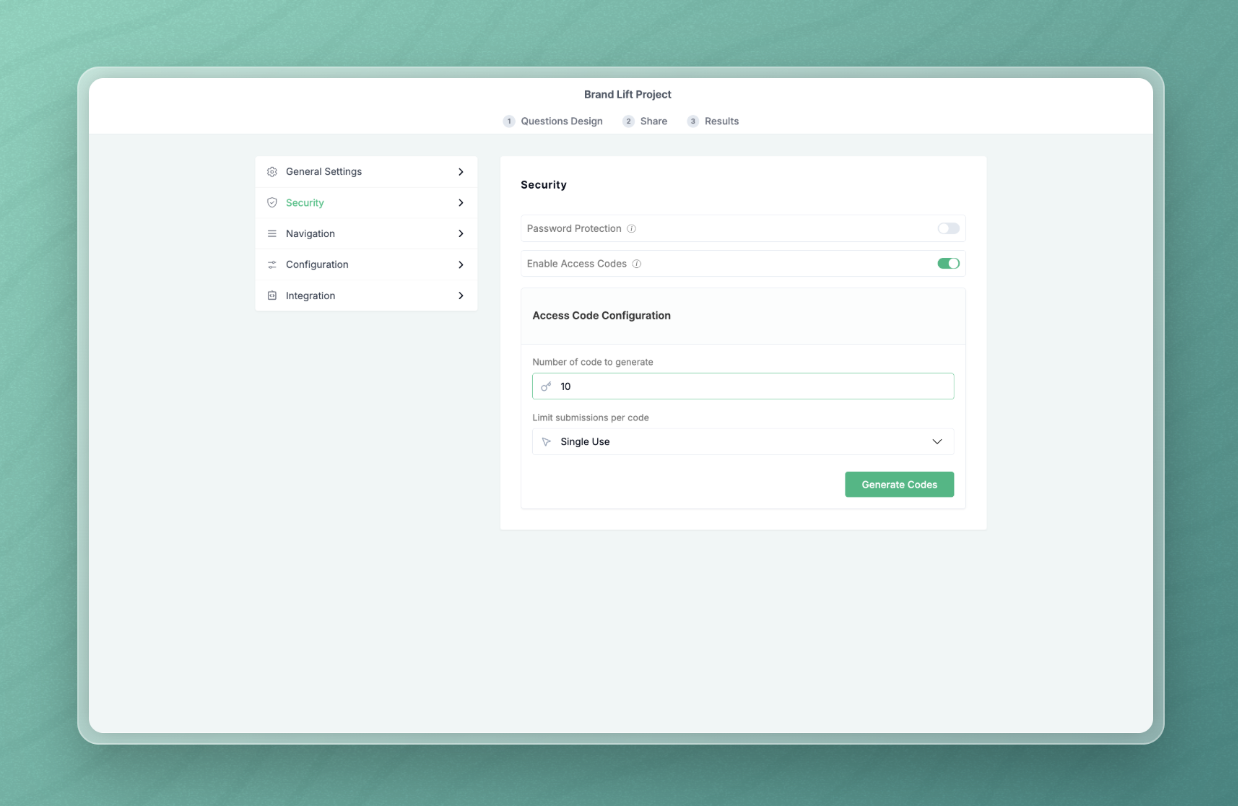
How it works
Instead of one shared URL, the platform generates a list of unique links - one per intended respondent. Each link contains a hidden unique identifier. There is nothing visible to the respondent - no code to enter, no indication the link is unique to them. They click it and see a normal survey. The tracking happens in the background.
Two delivery modes are available:
- URL delivery (most common) - you distribute one link per contact through your own channels: email, CRM, or your account team. The respondent clicks the link, completes the survey, and the link is marked as used. It cannot be used again.
- Code entry - for contexts where respondents access a shared portal rather than receiving individual emails. For example, an internal survey accessed from a company intranet. Respondents are given a unique code to enter manually on the survey landing page. The mechanic is the same - the delivery is different.
Your contact list never enters the Standard Insights platform at any point. You download a file containing every unique link alongside its current status - completed or pending - and distribute it through your own systems.
For a full walkthrough of survey distribution options, see How to Collect Responses and Build Your Report.
Tracking and fieldwork management
At any point during fieldwork, re-downloading the file shows the current status of every link - completed or pending - in real time. For clients working with Standard Insights on a managed basis, a weekly performance update covers completion rates per market and the current status of every link. Your team gets a clear view of which contacts need a follow-up, without Standard Insights ever handling the contact list itself.
When to use it
B2B customer experience and NPS studies
Surveying your own customers to measure satisfaction, loyalty, and relationship strength. Your account team distributes links directly. Responses are anonymous to the account team but fully trackable for fieldwork management - you can see completion rates without seeing individual answers.
B2B reputation studies
Surveying industry contacts, partners, or stakeholders on brand perception and service quality. The same mechanic applies: individual links, one completion per contact, full fieldwork visibility.
Internal employee surveys
HR or leadership surveying their own workforce. Staff receive individual links, complete the survey once, and responses remain confidential. Response rates are trackable at an organisational or team level without exposing individual answers.
Why personalised outreach and anonymous responses matter together
Personalised outreach improves response rates. People are more likely to complete a survey sent by someone they know - an account manager, a salesperson, an HR lead - than one that arrives from a cold agency link. That's a significant fieldwork advantage.
But personalised outreach creates a trust problem. Respondents worry their individual feedback will be visible to the person who sent it. That concern produces softer, less honest answers - particularly in markets where hierarchy and relationship dynamics make critical feedback less likely in non-anonymous settings.
The unique link system resolves both sides of this tension. The known contact sends the link - response rate benefit. The response goes directly and anonymously to the platform - confidentiality benefit. The contact list never leaves your systems - data privacy benefit. The respondent gets a frictionless one-click experience. You get honest data. Fieldwork stays manageable throughout.
FAQ
Does the respondent know their link is unique to them?
No. The unique identifier is embedded in the link itself and is not visible to the respondent. There is no code to enter, no message indicating the link is personalised, and nothing in the survey experience that differs from a standard shared link. The respondent clicks and sees a normal survey. All tracking happens in the background.
What happens if someone tries to complete the survey twice using the same link?
Once a link has been used to complete the survey, it is marked as used and cannot be submitted again. If a respondent clicks the link a second time, the survey will not accept a second submission. This is what makes the unique link system reliable for known-audience studies - each contact gets exactly one response recorded.
Does Standard Insights ever see my contact list?
No. Your contact list never enters the Standard Insights platform. You download the file of unique links and distribute them through your own systems - email, CRM, or however you manage contact outreach. The platform receives completed responses. It has no access to the names, email addresses, or any other identifying information associated with those links.
Can I track which specific contacts have responded?
You can track completion status - completed or pending - per link. Because you hold the file that maps each link to each contact, you can identify which contacts still need a follow-up. However, individual responses are not linked back to specific contacts within the platform. The response data is anonymous - the unique link tracks whether a contact has completed the survey, not what they said.
What's the difference between URL delivery and code entry - which should I use?
URL delivery is the right choice for most situations - it's frictionless for respondents and the simplest to manage. Each contact receives their own link, clicks it, and completes the survey in one step. Code entry is better suited to contexts where individual email distribution isn't practical - for example, where respondents access a shared internal portal and it's easier to issue a code than a personalised link. If you're not sure which fits your setup, URL delivery is the default.
Can I use this for consumer panel surveys?
No. Unique Survey Links is designed for known-audience studies - situations where you have a specific list of contacts you want to survey. Consumer panel surveys use a shared URL distributed to a broad recruited audience, where individual tracking by contact is neither needed nor appropriate. If you're running a consumer panel study, standard distribution via URL link or QR code is the right approach.